With the next release of Dynamics 365 for Finance and Operations Enterprise edition we plan to soft seal the Application Suite model.
For anyone not yet familiar with this agenda, please read through the previous announcement
The partner channel need to be educated for them to successfully migrate their development to using extensions instead of overlayering.
In order to help with that we have created a dedicated section on Extensibility in our documentation, which has a number of details about our plans, the process of migrating to extensions, as well as specific How to articles around platform capabilities, as well as specific application frameworks and how to extend them (coming soon...)
Home page for Extensibility documentation
If you cannot find a particular topic, let us know, either directly on the docs page, or here through comments to this post.
Hope this helps!
Thanks
Showing posts with label Microsoft. Show all posts
Showing posts with label Microsoft. Show all posts
Tuesday, July 18, 2017


Thursday, October 06, 2016
Development tool: Copy 'Find references' results to clipboard (to Excel) in Visual Studio for AX 7
Problem
With the release of Microsoft Dynamics AX 7 the development moved to the Visual Studio environment.This had a lot of advantages, like the ability to use any 3rd party add-ons of various sort (which we actually have not seen that many of being applied to AX so far), all the VS goodies that come out of the box, a more familiar IDE for new developers, etc.
But it also has its disadvantages, like the Cross-References display window.
- First of all, the indicator of whether a particular reference is writing or reading is gone.
- And we now display the xRefs using the standard Visual Studio "Find Symbols Results" window, which has one huge drawback as well - no way to filter on the data displayed, or copy that data somewhere else to do that.
Solution
I was bothered by this lack of functionality for a while, so I went out to find if there's an existing solution. I came across this post, which seems like a sufficient solution for the problem, in my opinion. Kudos to the author!
I have modified the project a bit to better suite AX needs, as I planned to browse the data in Excel, which has rich filtering capabilities and more convenience in navigation, and uploaded it to GitHub so anyone can use and extend it. You can also just download the executable, if are OK with the out-of-the-box functionality I will describe below.
Project on GitHub:
Executable on my OneDrive:
Installation guide
Once you have the executable, place it in a folder on your environment running Visual Studio for AX, say, C:\Tools or whatever you prefer.
Now, from Visual Studio, go to Tools and select External tools..., as shown below:
 |
| External Tools... under Tools menu in Visual Studio |
Now add a new tool by clicking Add, and specify the Title, Command and Initial directory.
The Command should contain the path to the CopyFindReferencesToClipboard executable
 |
| Add the CopyFindReferencesToClipboard tool |
User guide
Using the tool is very simple. Say I wanted to find all references to the WHSLoadLine.Qty field.
I would navigate to that field and select Find references from the context menu.
 |
| Find references to the WHSLoadLine.Qty field |
This would bring up the standard Visual Studio dockable window Find Symbol Results, containing all the references to the selected table field.
Now, all you need to do is go to Tools and select the newly added tool from the list, as shown below:
 |
| Run the tool to copy the references to clipboard |
After a few seconds you will get a message box to pop up telling you the references have been copied to clipboard successfully, which means you can now to and paste the data to Microsoft Excel.

Note. Since the tool uses UI-level automation to copy the cross-references, the Find references window needs to be open and visible for the tool to work.
Now, you can do whatever you want with that data in Excel.
The way I typically use it is by just showing the data as a Table, after which:
- Exclude test related files (Actual tests and Test frameworks we used)
- Filter out only elements in a certain area, like WHS
- Build pivot tables/charts, if I am doing complexity analysis for a change / feature
- etc.
Here's how it looks:
 |
| Analyze the cross-references in Microsoft Excel |
Feeback
Give it a try and let me know what you think!
Sunday, September 18, 2016
Tutorial: Dealing with rush orders or the skill of "Ship now" in Dynamics AX
Introduction
Quite often, situations happen in supply chain which require the warehouse to handle rush orders, meaning that they need to ship the same day, if not immediately.At the same time, the normal levels of data accuracy are still expected, meaning workers cannot just ship the goods without simultaneously registering everything in AX, as to not allow the data to get out of sync with the real world.
But, even though this situation is quite common, Microsoft Dynamics AX does not handle it quite that well. Specifically, once the work is created, you can't ship the load until after all work has been executed, including any intermediary stages (quality inspection, packing, etc.)
An alternative scenario is when delivers to a customer are done on a regular basis, using a third party logistics provider like UPS for deliveries, and per agreement their transportation vehicles depart from our docks at a particular point in the day. In such cases the workers may get instructions (or make the decision on their own if experienced) to skip certain picks and just ship what has already been picked, just to make the cutoff time. The remaining goods would be then shipped with the next planned delivery.
Today I would like to show one of the possible ways of achieving better results in the above scenarios with the out-of-the-box functionality in Microsoft Dynamics AX by showing two features:
- Skipping non-mandatory work lines
- Short picking without impact to the inventory but with load line qty reduced
Walk-through
I have created the following sales order in AX, which turned out to be a rush order, so I need to avoid the staging step I usually go through when picking such items, and instead, take the items directly to the bay door, where the truck is already waiting.Note. For the purpose of the demo, I only have 2 items and no prior picks completed.
 |
| Rush sales order |
 |
| Open Work order |
Well, for this to work, the corresponding lines in the work template used to create this work must have been set up as optional (Mandatory flag was not set)
Luckily, that was the case for this order, so I can move on to step #2, actually skipping these lines.
That is done from the Load by selecting the "Skip non-mandatory work" button, as shown below:
 |
| Load in Waved status with "Skip non-mandatory work" button |
Now the work looks like below. Note how the work class has been updated to enable the initial picker to load the goods as well
 |
| Open work order, where staging lines are skipped |
OK, so let's execute this work now. We'll use a standard mobile device menu item with user directed work execution method.
The worker picks the first item from the picking area very close to the outbound dock, as shown below.
 |
| Initial pick instruction from a Picking area |
Walking over to that area takes a whole 30 minutes, and John knows that he needs this order to ship in 10, so he makes the decision (or is called by the warehouse manager with instructions) to not ship this item now, but do it the next day or whatever the agreement is with the customer.
For this, he's going to short pick this item. Since we are not going to pick any items, he'll enter the quantity of 0, and select the reason for short picking - Ship Now, which we'll talk about in a minute.
 |
| Short pick with reason = Ship Now |
After confirming the short pick, he'll immediately be asked to put the items he did pick (in our example just 1) to the BAYDOOR location, since we skipped the other lines
 |
| Put directly to Baydoor |
As a result, the work looks like below:
 |
| Work in status "Closed" |
All work lines have been Closed, and as you can see the remaining quantity is 0 for both picks, and for one of them the work quantity is also 0, since that was the line we short picked.
Now, hold on, you might say. I do not want to short pick these items - does that not tell the system that the items are actually not there, and in many cases adjust them out or create cycle counting work?
Not in this case. See the setup I have done for the Ship Now work exception below:
 |
| Short pick work exception "Ship Now" |
As you can see, I have not selected to create cycle counting work or adjust these items out. All I selected was to Automatically decrement shipment or load
What that means is that on-hand will not be impacted in any way, however the quantity on the respective load line will be decreased, essentially taking this item off the load. Note that the source document line (in this case, sales order) is not impacted, since the customer still expects those goods. We do not currently support also reducing the quantity on the sales order. You will have to use the "Deliver remainder" function from the sales order line explicitly to achieve that.
So, let's take a quick look at the load now.
 |
| Load in status "Loaded", where 1 line has 0 qty |
As you can see, the status of the load has been updated to Loaded, meaning all the goods planned for this load are on board.
You can read more about the various statuses of the Load/Shipment in my previous blog post:
That means we can now ship this load, as shown below:
 |
| Load in status "Shipped" |
Hope this will help some of you avoid unnecessary customizations
Let me know if you have any questions.
The Cloud, what it all means and how it applies to Microsoft Dynamics AX
The ERP world is changing rapidly due to to cloud implementations as there are big differences in implementing and running the business in the cloud versus on-premise.
There is a lot of talk about what IaaS, PaaS and SaaS can offer a company, but these are never well described, and I have seen a lot of people being confused about what each of these actually means / does for a company.
Today I read a nice short description of the benefits you get with applying IaaS, PaaS, SaaS that I wanted to share:
The current version of AX, released under the codename "AX 7", provides infrastructure and platform as a service, and you could say software as a service for many of the small and medium businesses. Partners have been active filling the gap with their custom solutions available through the Microsoft AppStore.
Note Historically AX has been a favored development platform so many would buy it with the purpose of customizing the logic to match the exact needs of the business, instead of attempting to configure it "the right way" and adjust their business processes. In my opinion that hinders the adoption of AX 7 a bit, as it made it a bit more difficult to re-tailor it as they see fit.
With future releases of AX, I'd expect to see Microsoft converge more and more into providing a rich business SaaS offering. I am excited to see how much closer the release of Dynamics 365 will bring us to this goal.
What's your opinion? Do you agree with the definitions above and how they apply to AX?
There is a lot of talk about what IaaS, PaaS and SaaS can offer a company, but these are never well described, and I have seen a lot of people being confused about what each of these actually means / does for a company.
Today I read a nice short description of the benefits you get with applying IaaS, PaaS, SaaS that I wanted to share:
- IaaS - Infrastructure as a service. This allows for the sharing of raw computing power and storage, including such pieces as databases, rules engines, processing power and other infrastructure capabilities. With cloud these can be accessed and leveraged on an “as needed” basis. Similar to the power grid, you pay for what you use. IaaS is what the corporate IT department needs to enable your day-to-day tools to operate with reliable and fast response
- PaaS - Platform as a service. This allows developers to access tools to create their own applications. The building blocks are made available by the software vendors to provide a jump start on development. PaaS is what your supply chain IT support or third party consultants use to create customized workflows or tools specific to your needs
- SaaS - Software as a service. The business process application (“solution” in vendor-speak) layer in the cloud. Users can rent applications on a per use basis to tackle specific business issues. SaaS is what you log on to use without any customization.
The current version of AX, released under the codename "AX 7", provides infrastructure and platform as a service, and you could say software as a service for many of the small and medium businesses. Partners have been active filling the gap with their custom solutions available through the Microsoft AppStore.
Note Historically AX has been a favored development platform so many would buy it with the purpose of customizing the logic to match the exact needs of the business, instead of attempting to configure it "the right way" and adjust their business processes. In my opinion that hinders the adoption of AX 7 a bit, as it made it a bit more difficult to re-tailor it as they see fit.
With future releases of AX, I'd expect to see Microsoft converge more and more into providing a rich business SaaS offering. I am excited to see how much closer the release of Dynamics 365 will bring us to this goal.
What's your opinion? Do you agree with the definitions above and how they apply to AX?
Friday, August 12, 2016
Tutorial: Anchoring and Dock management profiles in Warehouse management in Dynamics AX
Scenario introduction
Today I wanted to talk about some of the less known features we have in the Warehouse management module, namely the Anchoring functionality and the Dock management profiles.
Let's start with just describing a scenario where this might be useful.
A company might be reselling goods in an environment, where deliveries are frequent, and there is no time at the dock door to sort out situations where the goods are spread out across multiple staging locations. The trucks need to pick up everything already packed nicely and be off fast. Very often, the truck driver himself would load the goods on the truck, without waiting for warehouse crew (in which case he'd have a WMDP scanner hooked in to our system). Sounds like a typical day for any distributor.
In order to achieve efficiency in the above scenario, multiple things need to come together:
- In case of multiple picks for the same delivery, they need to all be assembled in the same place so it takes less time then to load them into the truck
- Since the number of staging / loading lanes is limited, we need to restrict how many deliveries are placed in each one, so there is no confusion later about what goes where
- Dock scheduling needs to be in place, so there are no hold ups due to unavailability of dock doors upon truck arrival (outside the scope of this blog post)
Anchoring
This feature gives you the ability to "anchor" multiple work order lines together, so that items picked all follow the same path in the warehouse. You can choose if you want the work to be grouped together based on the shipment they belong to, or the load they are on.The setup is very simple, and you only need to choose if you want to anchor by shipment or by load.
It is done on the Mobile device menu items form for any menu items that are of type "Existing work" (apart from Cycle count grouping and Handle by License plate). First you tick the Anchor checkbox, and that will allow you to select what to Anchor by, as shown in the screenshot below:
 |
| Anchoring on Sales Picking mobile device menu item |
And that's it. Now, when any of the work lines from the shipment/load is put down into a specific location, whether that is for staging or at the final shipping location, all other related work lines will be updated with the same location.
All the proper validation, such as checking for mixing rules, batch mixing, status mixing, etc. are performed, of course, along with the check for dock management rules, which we'll talk about below.
This feature is also useful when a worker is to put items for order 1 in a staging location by Dock 1, but can’t because a previous load hasn’t cleared the location. Rather than waiting for the Dock 1 staging location to become available, the worker decides to use the staging location for Dock 2 instead, and overrides the suggested staging location. The put location for all remaining items for the related work orders is updated to the Dock 2 staging location automatically.
Note
If you subsequently override the location when executing one of the anchored puts, that will be allowed, and will not update the other locations, treating this put as a 'special case'. If you do not want that to happen, you could consider not allowing your workers to override Put location (That is set up on the Worker).Technical details
- Work is anchored inside the WHSWorkExecuteDisplay.processWork() method, that is, during work execution, more specifically, when executing the Put step.
- This is done by invoking WHSWorkExecute.anchorWork(), which in turn invokes depending on the setup one of the two methods:
- WHSWorkTable::anchorWorkByShipment()
- WHSWorkTable::anchorWorkByLoad()
- Work lines that were anchored are stamped accordingly through the IsAnchored field
Dock management profiles
This feature extends the restrictions you can put in place on where goods can be placed in the warehouse, e.g., not allowing to have more than 1 item or batch, or inventory status, in a location.Through dock management profiles you can restrict that items are not placed into a location, if they belong to a different order, or a different load, or even a different work order type. You configure this through the Dock management profiles form, as shown below:
 |
| Dock management profiles |
These rules are validated both when work is only being created (as in, when evaluating the locations found through the Location directives), as well as when executing the Put, as in the above example with anchoring. It is also triggerred when changing the work location for a shipment or load (By clicking on Change work location button in the corresponding form).
Note, that no validation will be performed (including the general mixing rules and stocking limits) when determining the location to Put, if the Assume empty location for new wave is set on the dock management profile.
As the name implies, these restrictions only apply to staging locations and final shipping locations.
You configure this by specifying a dock managment profile on the selected location profile, as shown in the screenshot below:
 |
| Dock management profile Id on STAGE location profile |
Note, that even though you can specify a dock management profile for any location profile, including inbound, it will not have any effect.
Technical details
- Class WHSDockManagement is responsible for all the validation ensuring we do not mixed inappropriately in the location.
- Static method validateDockMgmtMixing is the entry point
Scenario walk-through
Note
I have highlighted in bold the 3 points I want to make in the walk-through.
I have created the following 3 sales orders for the demo:
- SO 000779, part of Load USMF-000007
- 10 pcs of item M9200 from WH 51
- 20 pcs of item M9201 from WH 51
- SO 000780, part of Load USMF-000007 (added after the first order was released to warehouse)
- 7 pcs of item M9200 from WH 51
- SO 000781, part of Load USMF-000008
- 3 pcs of item M9201 from WH 51
I have released them to the warehouse, as a result getting three work orders:
- Work USMF-000017
- Pick 10 pcs of M9200 from BULK-001
- Pick 20 pcs of M9201 from BULK-002
- Put 30 pcs to STAGE
- Pick 30 pcs from STAGE
- Put 30 pcs to BAYDOOR
- Work USMF-000018
- Pick 7 pcs of M9200 from BULK-001
- Put 7 pcs of M9200 to STAGE
- Pick 7 pcs of M9200 from STAGE
- Put 7 pcs of M9200 to BAYDOOR
- Work USMF-000019
- Pick 3 pcs of M9201 from BULK-003
- Put 3 pcs of M9201 to STAGE2
- Pick 3 pcs of M9201 from STAGE2
- Put 3 pcs of M9201 to BAYDOOR
As you can see, the third work was directed to a different staging location, STAGE2, because I have set up the dock management profile to prevent mixing of items not belonging to the same Load. The first two work orders are both going to STAGE, since they belong to the same load.
Now, we will execute the second work and attempt to override the Put location, and put it to STAGE2 instead of the suggested STAGE:
 |
| Put step for Work USMF-000018 |
 |
| Specify reason for Override Location |
 |
| Specify new location |
 |
| Error message |
As you can see, we have received a message "Failed to change location due to dock management rules.". That is as we expected, because we have work 3 already on its way to STAGE2, and it belongs to a different Load, so cannot be mixed.
Let's now specify a valid location, STAGE3, which is empty and has no incoming work:
 |
| Confirm Put to location STAGE3 |
After confirming the Put, we get the standard "Work completed" message. Let's now review the work:
 |
| Work USMF-000018 |
As expected, the second work was updated to reflect the overridden location. This has nothing to do with anchoring, just standard "Override Loc" behavior. But we know that the first work, Work USMF-000017 should also have been updated, because it is anchored by Load. Let's take a look:
 |
| Work USMF-000017 |
As you can see, it was also updated to now point to STAGE3, both on the Put and the following Pick step (as this is a staging location, so we know there are subsequent steps). Trying to execute this work now would suggest STAGE3 as the location to put the item into.
The same can happen for loading work, updating the final shipping location on all relevant work lines, if the Sales Loading mobile device menu item was set up accordingly.
Pretty simple, but with great flow control for the warehouse managers out there.
Conclusion
Let me know if you find these features useful, and if you use them in an alternative way in your company / have modifications on top.Thanks
Wednesday, July 06, 2016
Announcement: Microsoft Dynamics 365 and Microsoft AppSource
Today Microsoft made a big announcement related to Dynamics and its future.
Please take the time to read the announcement and comment below on what you think this means and how important of a change it is for us.
Thanks!
Please take the time to read the announcement and comment below on what you think this means and how important of a change it is for us.
Thanks!
Sunday, June 26, 2016
Walkthrough: Processing of inbound ASNs in Warehouse Management in AX '7'
Introduction
A while back I posted a blog post explaining how to configure and process incoming ASN documents in AX 2012 R3. You can find it here.With the release of the new Dynamics AX version, it was time for an update, since the implementation changed completely, even though the data model behind stayed the same.
If you are interested in inbound ASNs, you have a number of options below to educate yourself on how they work in the current release of AX.
In the process, you will get an understanding of the following concepts:
- Data entities
- Composite data entities
- XML structure of the ASN files
- Data management workspace
- Service endpoint authentication
- Azure Active Directory app registration
- REST enqueue API, GitHub app
- etc.
Youtube video
If you prefer Youtube, here is the link to the recording.Word document
If you are more into reading, you can view the transcript walkthrough here.Sample ASN files
Here are the 2 XML files I used in the walkthrough.
Thanks for watching / reading!
Thursday, June 09, 2016
Announcement: We are hiring!
We are hiring Microsoft Dynamics AX software engineers @ Microsoft Lyngby in Denmark (Supply Chain Management Center of Excellence).
 |
| Microsoft Lyngby |
Want to work for one of the largest software companies in the world?
We have a number of positions open for the Dynamics AX team, ranging from senior positions for people with multiple years of industry experience to those just beginning the software development journey.
Find the 4 open positions below - you can apply directly from the page there.
- AgileSoftware Development Engineer
- SoftwareDevelopment Engineer
- SeniorSoftware Development Engineer
- AgileSenior Software Development Engineer
Let me know if you have any questions through the comments below
Thank you, and hope to see you joining our team in Denmark soon.
Saturday, February 20, 2016
Announcement: Microosft Dynamics Salary Survey 2016
As you saw from my last post, Tech Conference is happening next week.
That is a great opportunity to mingle with other partners and developers, potentially finding that ideal place of work you have always dreamed of.
In that context, consider participating in the Microsoft Dynamics salary survey carried out each year by Nigel Frank.
I always enjoy reading through and comparing all the numbers and just the general stats are pretty fun.
Here's a more detailed description of the survey from the organizer. Note some nice Microsoft branded prizes for 3 random participants. It's free to participate, and the chance to win is pretty good, considering the number of Dynamics specialists out there. Go for it!
Take the Survey Now

http://goo.gl/Hfsw6N
Thanks
That is a great opportunity to mingle with other partners and developers, potentially finding that ideal place of work you have always dreamed of.
In that context, consider participating in the Microsoft Dynamics salary survey carried out each year by Nigel Frank.
I always enjoy reading through and comparing all the numbers and just the general stats are pretty fun.
Here's a more detailed description of the survey from the organizer. Note some nice Microsoft branded prizes for 3 random participants. It's free to participate, and the chance to win is pretty good, considering the number of Dynamics specialists out there. Go for it!
Take the Survey Now
Find out How Your Salary Compares to Others in Microsoft Dynamics Roles. Take Microsoft Dynamics Salary Survey 2016Follow this link to take the survey
Take part in Nigel Frank’s industry acclaimed annual Microsoft Dynamics Salary Survey in its 7th edition and find out how your remuneration compares to others in similar roles. You will automatically be entered into a prize draw to win a Microsoft Surface Pro 4, Xbox One or Microsoft Band 2.
Once the Salary Survey report has been compiled, you'll be one of the first to receive it via email. The results of the survey give an unparalleled insight into global salary trends for Dynamics professionals. It will allow you to benchmark your team’s, company’s and your own salary against your peers.
http://goo.gl/Hfsw6N
Thanks
Monday, February 16, 2015
Microsoft Dynamics Salary Survey 2015
 |
| Win one of these cool prizes! |
Find out How Your Salary Compares to Others in the Industry. Take Microsoft Dynamics Salary Survey 2014-2015
Take part in Nigel Frank’s industry
acclaimed annual Microsoft Dynamics Salary Survey and find out latest Dynamics
compensation trends. You will automatically be entered into a prize draw to win
a Microsoft Surface Pro 3, a Nokia Lumia 1520 or an Xbox One.
Friday, January 20, 2012
Microsoft Dynamics Salary Survey 2012 - Please participate
I don't usually make posts like this, but this is one of those things I always look forward to reading when it comes out, so I decided helping the guys out won't hurt :)
What I am asking from you guys is some time (2 minutes or so) to fill out the survey below about how much you make, what kind of benefits you get, where you work, and so forth. It's anonymous, obviously, and every participant will get a copy of the report afterwards. And this time around, you can even win something for participating! So please do.
What I am asking from you guys is some time (2 minutes or so) to fill out the survey below about how much you make, what kind of benefits you get, where you work, and so forth. It's anonymous, obviously, and every participant will get a copy of the report afterwards. And this time around, you can even win something for participating! So please do.
 |
| Participate in the survey about Dynamics |
Microsoft Dynamics Salary Survey 2012
Nigel Frank International would like to invite you to complete our annual survey of global Microsoft Dynamics salaries. The survey will only take a couple of minutes to complete and your response and any personal details will be kept strictly confidential. Complete the survey by the closing date and you will automatically be entered into our prize draw to win one of five amazing prizes:
1st Prize = Apple iPad2 16gb with Wi-Fi + 3G
2nd Prize = Microsoft Xbox 360 250gb + Kinect
3rd Prize = Kindle Keyboard with Free 3G + Wi-Fi
4th Prize = Microsoft LifeCam Studio Webcam
5th Prize = Microsoft Arc Touch Mouse
1st Prize = Apple iPad2 16gb with Wi-Fi + 3G
2nd Prize = Microsoft Xbox 360 250gb + Kinect
3rd Prize = Kindle Keyboard with Free 3G + Wi-Fi
4th Prize = Microsoft LifeCam Studio Webcam
5th Prize = Microsoft Arc Touch Mouse
You will also receive a FREE copy of the Salary Survey report once it has been compiled.
Wednesday, July 07, 2010
Advertisement: MDCC is looking for talent!
 Hello, all.
Microsoft Development Center in Copenhagen has a number of open positions for Software Development Engineers in Test (SDETs), to work in the team responsible for shipping the latest version of the Microsoft Dynamics AX product.
Below is a detailed description of one of the currently open positions (SDET II role). Salary level and title are based on your education, number of years of experience, etc., nothing new here. Dynamics AX background is, of course, a plus (I assume this applies to all my readers).
The Microsoft Dynamics AX product group has an open position for a Software Development Engineer in Test (SDET) within our supply chain management teams. The position provides unique opportunities for professionals with a diverse background of business acumen and software engineering to work on one of the fastest growing Enterprise Resource Planning (ERP) products in the market.
Responsibilities:
Write and review technical requirements and design documents
Plan, design, and write code for automated tests of features within the supply chain management features of Dynamics AX
Create and use test tools and processes to both increase effectiveness in the daily work and assure quality of the product
Collaborate with other engineers to ensure all feature areas achieve the desired high level of innovation and quality our customers demand.
Requirements:
We are looking for engineers with a strong background in object oriented development. Experience with business applications or ERP solutions are pluses.
Software development experience, particularly within C#, C++ or similar object oriented programming languages
Strong technical and analytical skills
Excellent problem solving and design skills
Ability to work independently - and in teams
An excellent command of written and spoken English
Experience with Microsoft Dynamics AX or ERP products is a plus
Experience with X++ (a Dynamics AX language) is a plus
Software testing experience with an organized and structured approach is also a plus
We are also looking for less experienced people for the IAESTE student program, so all you excellent Computer Science students, interested in developing business applications and working for one of the world's leading software companies, welcome!
If you are interested in applying for the positions, please e-mail me your up-to-date CV at ivan.kashperuk(@nospam)hotmail.com
An additional request I would like to make is to leave a comment here, if you are invited to an interview, describing how it went, how you were treated, and what your impression was of the entire process, the MDCC campus, the interviewers, etc. This will help us make improvements in our hiring process, so I am really waiting for your comments. Note that anonymous comments are allowed.
Some additional information about MDCC:
Microsoft Development Center Copenhagen (MDCC) was created in 2002 following the acquisition of the Danish company Navision. Today, it has grown to be Microsoft’s biggest development center in Europe and a spearhead in the European IT industry. MDCC is Microsoft’s Center of Excellence for Supply Chain Management and drives the development of several of the Microsoft Dynamics ERP (Enterprise Resource Planning) products. Our products enable companies throughout the world to optimize the planning of their resources – and increase their revenues.
Today, the development center gathers around 650 people from more than 40 different countries. Every third employee is a non-Dane and that makes MDCC to one of the most international companies in Denmark. MDCC has been widely awarded for its unique work culture and is a coveted career booster for top talents from all over the world.
Tuesday, January 05, 2010
Editor script for simplifying the search in AOT
When doing code refactoring, or when investigating a particular class or form to understand the functionality behind it, it is often handy to search for variables used in its methods, looking at where and how each variable is used.
It is tedious to manually go through the steps of copying the name of the variable into the clipboard, opening up the parent class/form, opening up the AOT Find dialog for it, pasting the variable name into the Selected Text field and pressing Find now.
I have automated these steps, putting the code into an editor script.
You can download the xpo, which contains the EditorScripts class with the additional method, by following this link.
Now you should be able to very easily and quickly find the required code.
The code of the editor script:
It is tedious to manually go through the steps of copying the name of the variable into the clipboard, opening up the parent class/form, opening up the AOT Find dialog for it, pasting the variable name into the Selected Text field and pressing Find now.
I have automated these steps, putting the code into an editor script.
You can download the xpo, which contains the EditorScripts class with the additional method, by following this link.
Now you should be able to very easily and quickly find the required code.
The code of the editor script:
///
/// Editor script for finding all occurrences of the selected text in the parent node of the selected method
///
///
/// Reference to the AX editor
///
///
/// 2010-01-05, ivanv
///
void addIns_FindAllOccurrencesInNode(Editor e)
{
    #AOT
    TreeNode    treeNode;
    FreeText    selectedText;

    FreeText GetSelectedTextFromEditor(Editor _e)
    {
        str 1       curSymbol;
        int         iCopyFrom;
        int         iCopyTo;
        FreeText    _selectedLine;
        ;
        if (_e.markMode() != MarkMode::NoMark && _e.selectionStartCol() != _e.selectionEndCol())
        {
            _selectedLine = strLRTrim(subStr(_e.currentLine(), _e.selectionStartCol(), _e.selectionEndCol() - _e.selectionStartCol()));
        }
        else
        {
            _selectedLine = _e.currentLine();
            for (iCopyFrom = _e.columnNo()+1; iCopyFrom >= 0; iCopyFrom--)
            {
                curSymbol = subStr(_selectedLine, iCopyFrom, 1);
                if (!strAlpha(curSymbol) && curSymbol != '_')
                    break;
            }
            for (iCopyTo = _e.columnNo()+1; iCopyTo <= strLen(_selectedLine); iCopyTo++)
            {
                curSymbol = subStr(_selectedLine, iCopyTo, 1);
                if (!strAlpha(curSymbol) && curSymbol != '_')
                    break;
            }
            _selectedLine = (iCopyFrom < iCopyTo) ? subStr(_selectedLine, iCopyFrom + 1, iCopyTo - iCopyFrom - 1) : '';
        }
        return _selectedLine;
    }

    void FindLinesContainingSelectedText(FreeText   _selectedLine)
    {
        Args                args = new Args(formstr(SysAOTFind));
        FormRun             sysAOTFindFormRun;
        FormStringControl   containingTextCtrl;
        FormButtonControl   findNowBtnCtrl;
        ;

        sysAOTFindFormRun = classFactory.formRunClass(args);
        sysAOTFindFormRun.init();
        sysAOTFindFormRun.run();

        // Set the text to find
        containingTextCtrl = sysAOTFindFormRun.design().controlName(identifierStr(ContainingText));
        containingTextCtrl.setFocus();
        containingTextCtrl.pasteText(_selectedLine);

        sysAOTFindFormRun.detach();

        // Launch the search process
        findNowBtnCtrl = sysAOTFindFormRun.design().controlName(identifierStr(FindNow));
        findNowBtnCtrl.clicked();
    }
    ;

    selectedText = GetSelectedTextFromEditor(e);
    if (selectedText)
    {
        // Find the currently open method node
        treeNode = TreeNode::findNode(e.path());
        // Find the parrent node of the method
        treeNode = TreeNode::findNode(xUtilElements::getNodePathRough(xUtilElements::parentElement(xUtilElements::findTreeNode(treeNode))));
        if (treeNode)
        {
            treeNode.AOTnewWindow();

            FindLinesContainingSelectedText(selectedText);
        }
    }
}
Monday, October 26, 2009
Mock objects implementation for AX
As you might now, I am working as a Software Development Engineer in Test at Microsoft Development Center in Denmark.
But the only real test framework that comes with AX is the SysTest framework (you can read more about it here).
Below you will find another framework for Dynamics AX, that was written by one of the members on my test team and allows to implement and use mock objects for testing the AX application.
More information and download link
It would be great if you could try it out and provide your feedback here or directly on the author's blog.
But the only real test framework that comes with AX is the SysTest framework (you can read more about it here).
Below you will find another framework for Dynamics AX, that was written by one of the members on my test team and allows to implement and use mock objects for testing the AX application.
More information and download link
It would be great if you could try it out and provide your feedback here or directly on the author's blog.
Monday, September 28, 2009
New AX blog in da house
Most of you probably don't know Denis Fedotenko, but he is a well-respected member of the Russian AX community with multiple incredibly detailed articles about SCM functional areas.
He has recently started translating them to English and posting on his web-site, http://fedotenko.info/.
I highly recommend all of you to visit the link above and read the articles already posted there.
He has recently started translating them to English and posting on his web-site, http://fedotenko.info/.
I highly recommend all of you to visit the link above and read the articles already posted there.
Sunday, April 26, 2009
Lookup methods tutorial + custom list lookup implementation
One of the great features available in Dynamics AX is the support of lookup forms that provide a user-friendly interface for selecting a value for a field from a list, and are highly customizable, allowing the developer great flexibility in meeting user needs.
Recently, I was posed a question of how to present a user with a list of custom-defined values in a lookup form.
The simple (and suggested) approach here is to create a new BaseEnum, containing all the specified values, and add a ComboBox control for this enumeration to the form. If the values are to be displayed conditionally (only a subset is shown each time), you can build a superset of all values in AOT, and use SysFormEnumComboBox class to limit the actual output at runtime.
But, this would not work in my case, because the values in the list were dependent on other data in the form plus the current date. Using a temporary table for this scenario seemed like an overkill (but possible). So i decided to investigate the system class SysLookup for hints on how this can be done with minimum effort. The implementation of this method is provided below.
As part of posting this implementation, I decided to also briefly describe some of the other lookup method options available to an AX developer, turning this post into a small tutorial on lookup methods.

1. The approach used most in the application is the implicit lookup based on table fields. As you can see from the control properties, DataSource and DataField specify which table field the control is based on. In my example, it is based on SalesTable.CustAccount, which uses the ExtendedDataType CustAccount, which has a relation to CustTable.AccountNum. Therefore, any time you add this field to a form, it will automatically provide a lookup button to select one of the customers.
Relations being specified on EDTs is at times confusing to people, who are used to seeing the relations between tables on the tables themselves. Technically speaking, such definitions on EDTs are incorrect. But no worries, AX supports the “correct” scenario out of the box as well. The relation to CustTable could have been specified on the table just as well.
2. 2nd most used approach is to specify the ExtendedDataType on the control directly. This is used to allow the user to specify a value to filter the records on directly from the form, for example (without the need to go to Extended Query form). It is also indirectly used on all RunBase dialogs in the system (when creating a DialogField, we specify the EDT to be used, which is transfered to the ExtendedDataType property on the corresponding control). In the tutorial, it is again the CustAccount EDT that is specified in the properties.
3. The 2 above examples both used metadata to define what lookup is to be displayed. The 3rd most used approach is relying on SysTableLookup class and builds the lookup at runtime. The code is relatively straightforward, and is described in more detail on MSDN. Using this approach, the developer can specify the query to filter the data being displayed in the lookup form. Note, that SysTableLookup only allows to have data from one table in the lookup form (+ display methods on this table). SysMultiTableLookup is an extension I have created a while ago, that adds this and other useful functionality to SysTableLookup class.
4. The remaining 2 standard approaches are rarely used in the application. Lookup based on ExtendedDataType is very similar to approach described under #2, but is executed from code at runtime. This way, you can change the lookup data displayed dynamically, based on some conditions (For example, on Ledger Journal lines, the offset account lookup shows vendors, customers, banks, etc. based on the offset account type specified on the line).
5. BaseEnum values are usually represented as a ComboBox (and, in special cases, CheckBox or RadioButton) control on forms in Dynamics AX. The lookup is provided by the kernel automatically for this type of control. But, sometimes, it is required to show the values of an enumeration in a string control – most common scenario is providing filter capabilities based on enums, where multiple values can be specified at once, similar to extended query form filters. In fact, this approach is actually used on SysQueryForm for enum fields. As you can see from the code, the lookup call is also very simple in this case.
6. This approach does not currently exist in the application, and the goals for its implementation were already described above. The lookup method code in this case looks rather straightforward, here it is:
public void lookup()
{
    Counter yearCount;
    List    valueList = new List(Types::String);

    for (yearCount = 0; yearCount < 5; yearCount++)
    {
        valueList.addEnd(strFmt("Year %1", year(SystemDateGet()) - yearCount));
    }

    SysLookup::lookupList(this, valueList, "List of years");
}
As you can see, the data displayed in this lookup depends on current system state (date) and other data (yearCount). It uses the class List to hold the values to be displayed.
You can download the project (Compatible with Axapta 3.0 – Dynamics AX 2009) with the tutorial and custom list lookup implementation by following the link below:
Note: The xpo contains changes to SysLookup class/form (only usr layer has been exported, for your convenience). Be careful when importing those, and don’t import them into the production environment.
Thursday, April 23, 2009
Be careful with join clauses when writing complex queries
Join clause evaluation is dependent on its position in the sql statement. In SQL Management Studio, if you try to specify the conditions incorrectly, you will receive the following error message:

In X++, you will not receive any compilation errors, nor any runtime errors. In complex scenarios with a lot of queries, this might go unnoticed, and will be extremely hard to weed out at a later stage, when data inconsistencies crawl in.
Take, as an example, the following job. At first glance, the 2 methods look exactly the same, and it seems as if they should work just fine. But in reality, the second method will return incorrect results, because inventSum.InventDimId will be treated as a constant (empty string as the default value) and not as a table field used in the same select statement.
QueryBuild classes have a major advantage in this situation, as you cannot easily add join clauses (links) unless adding to the child (joined) queryBuildDataSource.
static void JoinClauseWarningJob(Args _args)
{
    #define.ItemId("ESB-005")

    void testCorrectJoin()
    {
        InventTable inventTable;
        InventSum   inventSum;
        InventDim   inventDim;

        select inventTable
            where inventTable.ItemId == #ItemId
            join inventSum
            where inventSum.ItemId == inventTable.ItemId
            join inventDim
            where inventDim.inventDimId == inventSum.InventDimId;

        info(strfmt("Correct join where clause: %1", inventSum.AvailPhysical));
    }

    void testIncorrectJoin()
    {
        InventTable inventTable;
        InventSum   inventSum;
        InventDim   inventDim;

        select inventTable
            where inventTable.ItemId == #ItemId
            join inventDim
            where inventDim.inventDimId == inventSum.InventDimId
            join inventSum
            where inventSum.ItemId == inventTable.ItemId;

        info(strfmt("Incorrect join where clause: %1", inventSum.AvailPhysical));
    }
    // Actually execute the code
    testCorrectJoin();
    testIncorrectJoin();
}
So, the suggestion is simple: Use QueryBuild classes (or AOT queries) whenever possible, and pay attention to the order of tables and join clauses in the select statements that you write.
Thursday, January 22, 2009
Microsoft Dynamics Convergence 2009 New Orleans
Well, I cannot start with any statement other than a quote by Steve Ballmer as of today. Of course, most of you have already read this one place or the other:
Nevertheless, Microsoft Dynamics product line continues to grow, expand the feature set and customer base, and I am very confident it will have great success on the market in the future as well, even in the largest economy recession in many years.
Therefore, I would like to invite all of you to Convergence 2009, taking place March 10-13 in New Orleans, Louisiana, USA.
Microsoft Dynamics Convergence is one of the most exciting events in our business. It is an opportunity to listen to Microsoft plans for Microsoft Dynamics and related products, learn about all the possibilities your company can gain with these products, as well as meet with other business decision makers, Microsoft employees, and industry experts to gain knowledge, increase their understanding of Microsoft Dynamics business management solutions, as well as get some business insights how to thrive in the challenging economy.
Here are some links to get you started:
The session catalog (containing 225 sessions) is now live on the Convergence marketing site.
The Complete Guide to Convergence for Partners (PartnerSource access is required to access this link) is a valuable planning resource on PartnerSource. There are tips, tools and templates to help partners create the most worthwhile Convergence experience for their company and their customers’ companies.
I hope that many of you will be able to attend, and have a fun time there.
In light of the further deterioration of global economic conditions, Microsoft announced additional steps to manage costs, including the reduction of headcount-related expenses, vendors and contingent staff, facilities, capital expenditures and marketing. As part of this plan, Microsoft will eliminate up to 5,000 jobs in R&D, marketing, sales, finance, legal, HR, and IT over the next 18 months, including 1,400 jobs today. These initiatives will reduce the company’s annual operating expense run rate by approximately $1.5 billion and reduce fiscal year 2009 capital expenditures by $700 million. ...
Nevertheless, Microsoft Dynamics product line continues to grow, expand the feature set and customer base, and I am very confident it will have great success on the market in the future as well, even in the largest economy recession in many years.
Therefore, I would like to invite all of you to Convergence 2009, taking place March 10-13 in New Orleans, Louisiana, USA.
Microsoft Dynamics Convergence is one of the most exciting events in our business. It is an opportunity to listen to Microsoft plans for Microsoft Dynamics and related products, learn about all the possibilities your company can gain with these products, as well as meet with other business decision makers, Microsoft employees, and industry experts to gain knowledge, increase their understanding of Microsoft Dynamics business management solutions, as well as get some business insights how to thrive in the challenging economy.
Here are some links to get you started:
The session catalog (containing 225 sessions) is now live on the Convergence marketing site.
The Complete Guide to Convergence for Partners (PartnerSource access is required to access this link) is a valuable planning resource on PartnerSource. There are tips, tools and templates to help partners create the most worthwhile Convergence experience for their company and their customers’ companies.
I hope that many of you will be able to attend, and have a fun time there.
Tuesday, December 16, 2008
Supply Chain Management in Dynamics AX - a new Microsoft blog
For quite some time now, the MDCC (Microsoft Development Center Copenhagen) team has been nurturing the idea of launching our own blog about the Supply Chain Management area in Microsoft Dynamics AX.
And yesterday, it finally happened!
We posted the first article about Quality Management upgrade process for TQM solution (by Fullscope) users.

http://blogs.msdn.com/DynamicsAxSCM
I recommend all of you to add this link to your favorites, as we plan to post on a regular basis, and about things important to all of you. That said, I would like to invite all of you to post article ideas or questions related to Microsoft Dynamics AX SCM modules as comments to this message or directly on the SCM blog. We, in turn, will try to cover those in our blog posts.
And yesterday, it finally happened!
We posted the first article about Quality Management upgrade process for TQM solution (by Fullscope) users.
http://blogs.msdn.com/DynamicsAxSCM
I recommend all of you to add this link to your favorites, as we plan to post on a regular basis, and about things important to all of you. That said, I would like to invite all of you to post article ideas or questions related to Microsoft Dynamics AX SCM modules as comments to this message or directly on the SCM blog. We, in turn, will try to cover those in our blog posts.
Thursday, November 20, 2008
Personal Experiences with Live Mesh
This post is not going to be about Dynamics AX. It will be about a software product I was thrilled by so much I would like to share it with all of you.
I won't post a detailed description of the product here. You can read that yourself at www.mesh.com. But here is a brief introduction, just to give you a basic idea of what the software can bring into your life.
WHAT IS LIVE MESH?
With Live Mesh, you can synchronize files with all of your PCs (and soon your WM6 phone and Mac as well), so you always have the latest versions handy. Access your files from any device or from the web, easily share them with others, and get notified whenever someone changes a file. Working on one computer, but need a program from another? No problem. Use Live Mesh to connect to your other computer and access its desktop as if you were sitting right in front of it.
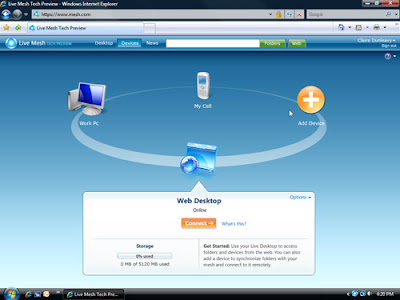
Here is a screenshot of the web interface for managing your devices in the mesh:
What I would like to share with you is the personal experiences I had using this software for a month now. In 1 word - fantastic. Live Mesh is still in Beta, but already I can tell you - simplicity is the word. You set it up (takes 5 minutes and is very simple, all you need is a LiveID, which I hope all of you already have). And that's it, you are done. And from then on - it just works. Great!
And here are 2 screenshots of how I use Live Mesh in my everyday life.
Obviously, I have all of my computers meshed, available to me when I need them (they need to be turned on, and have access to internet, of course).

And so far I have 4 folders in the mesh, and I would like to discuss each of them separately:
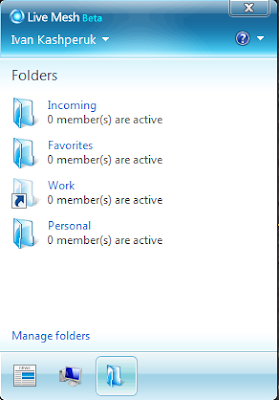
Personal - I store a backup of my personal data in this folder, which is synced across all my PCs, so that I have it at hand in case I need it. Plus, I have my Personal OneNote workbook in there, with all info I need.
Favorites - Favorites are not synced accross all my PCs, providing the same list on all of them in IE. This is great. This was a feature most of the browsers tried to implement throughout multiple releases. And here it is, as easy as it gets. Any time I bookmark a page, all my other browsers get this page bookmarked as well.
Incoming - this is the folder for file transfer between PCs. Now I don't have to send it to my e-mail every time I need a document scan or something. And, I invite other people as members of this folder, sharing pictures and other documents with them. That easy. And, they get updates every time I add a file, without me having to notify them.
Work - This is my work folder, which I don't sync to my home PC (you can see it is a ghost folder on the screenshot). Any file I work on is automatically synced between my work PCs, so I have an up to date file any time I access it. Extremely efficient.
Well, that's about it. Now, all you have to do is go and try it out yourself.
Have fun!
I won't post a detailed description of the product here. You can read that yourself at www.mesh.com. But here is a brief introduction, just to give you a basic idea of what the software can bring into your life.
WHAT IS LIVE MESH?
With Live Mesh, you can synchronize files with all of your PCs (and soon your WM6 phone and Mac as well), so you always have the latest versions handy. Access your files from any device or from the web, easily share them with others, and get notified whenever someone changes a file. Working on one computer, but need a program from another? No problem. Use Live Mesh to connect to your other computer and access its desktop as if you were sitting right in front of it.
Here is a screenshot of the web interface for managing your devices in the mesh:

What I would like to share with you is the personal experiences I had using this software for a month now. In 1 word - fantastic. Live Mesh is still in Beta, but already I can tell you - simplicity is the word. You set it up (takes 5 minutes and is very simple, all you need is a LiveID, which I hope all of you already have). And that's it, you are done. And from then on - it just works. Great!
And here are 2 screenshots of how I use Live Mesh in my everyday life.
Obviously, I have all of my computers meshed, available to me when I need them (they need to be turned on, and have access to internet, of course).

And so far I have 4 folders in the mesh, and I would like to discuss each of them separately:

Personal - I store a backup of my personal data in this folder, which is synced across all my PCs, so that I have it at hand in case I need it. Plus, I have my Personal OneNote workbook in there, with all info I need.
Favorites - Favorites are not synced accross all my PCs, providing the same list on all of them in IE. This is great. This was a feature most of the browsers tried to implement throughout multiple releases. And here it is, as easy as it gets. Any time I bookmark a page, all my other browsers get this page bookmarked as well.
Incoming - this is the folder for file transfer between PCs. Now I don't have to send it to my e-mail every time I need a document scan or something. And, I invite other people as members of this folder, sharing pictures and other documents with them. That easy. And, they get updates every time I add a file, without me having to notify them.
Work - This is my work folder, which I don't sync to my home PC (you can see it is a ghost folder on the screenshot). Any file I work on is automatically synced between my work PCs, so I have an up to date file any time I access it. Extremely efficient.
Well, that's about it. Now, all you have to do is go and try it out yourself.
Have fun!
Subscribe to:
Posts (Atom)