Code highlighting

Tuesday, December 16, 2008

Supply Chain Management in Dynamics AX - a new Microsoft blog

For quite some time now, the MDCC (Microsoft Development Center Copenhagen) team has been nurturing the idea of launching our own blog about the Supply Chain Management area in Microsoft Dynamics AX.

And yesterday, it finally happened!
We posted the first article about Quality Management upgrade process for TQM solution (by Fullscope) users.

http://blogs.msdn.com/DynamicsAxSCM

I recommend all of you to add this link to your favorites, as we plan to post on a regular basis, and about things important to all of you. That said, I would like to invite all of you to post article ideas or questions related to Microsoft Dynamics AX SCM modules as comments to this message or directly on the SCM blog. We, in turn, will try to cover those in our blog posts.

Thursday, December 11, 2008

Tool for protecting your Dynamics AX source code

"Is there a way to protect/hide my X++ code?"
People asked me this question a million times by now.

To most of them, I described 2 possible ways to go, that I know of:
- Do not share the source code, but instead provide the customers with an AOD file.
- Use a tool that would produce obfuscated code out of your modifications.

Both ways are not perfect, of course. If you provide the code as an AOD file, you need to be sure that the customer does not have X++ license. If you provide obfuscated code, the customer developers (if they are present) will have a hard time interacting with your code. And, eventually, both ways leave the customer at a disadvantage. As soon as the vendor is not there to support (provide fixes in terms of an updated AOD file or XPO with obfuscated code) them for whatever reason, the customer has no way of supporting the add-on solution on their own.

But this post is not about the cons of trying to protect your code.
It's about the possibilities. Today, finally, I can support my previous suggestion #2 with an actual link to such a tool: Next Innovation Code Scrambler Homepage

Here is a screenshot of how the code looks after Code Scrambler is finished with it:


Note, that the tool is not free, and I have not actually tried it out.
But there is a sample project showing the resulting scrambled code. You can download it for a first impression, and contact the company if you are interested in the tool.

Another note - this is not an advertisement, I am not in any way related to Next Innovation Company.

Thursday, November 20, 2008

Personal Experiences with Live Mesh

This post is not going to be about Dynamics AX. It will be about a software product I was thrilled by so much I would like to share it with all of you.

I won't post a detailed description of the product here. You can read that yourself at www.mesh.com. But here is a brief introduction, just to give you a basic idea of what the software can bring into your life.

WHAT IS LIVE MESH?

With Live Mesh, you can synchronize files with all of your PCs (and soon your WM6 phone and Mac as well), so you always have the latest versions handy. Access your files from any device or from the web, easily share them with others, and get notified whenever someone changes a file. Working on one computer, but need a program from another? No problem. Use Live Mesh to connect to your other computer and access its desktop as if you were sitting right in front of it.

Here is a screenshot of the web interface for managing your devices in the mesh:
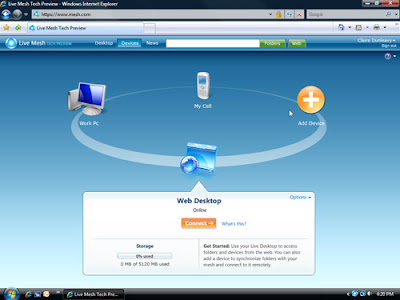

What I would like to share with you is the personal experiences I had using this software for a month now. In 1 word - fantastic. Live Mesh is still in Beta, but already I can tell you - simplicity is the word. You set it up (takes 5 minutes and is very simple, all you need is a LiveID, which I hope all of you already have). And that's it, you are done. And from then on - it just works. Great!

And here are 2 screenshots of how I use Live Mesh in my everyday life.
Obviously, I have all of my computers meshed, available to me when I need them (they need to be turned on, and have access to internet, of course).


And so far I have 4 folders in the mesh, and I would like to discuss each of them separately:
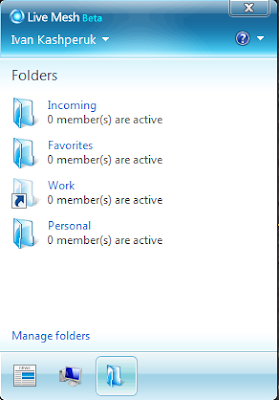

Personal - I store a backup of my personal data in this folder, which is synced across all my PCs, so that I have it at hand in case I need it. Plus, I have my Personal OneNote workbook in there, with all info I need.
Favorites - Favorites are not synced accross all my PCs, providing the same list on all of them in IE. This is great. This was a feature most of the browsers tried to implement throughout multiple releases. And here it is, as easy as it gets. Any time I bookmark a page, all my other browsers get this page bookmarked as well.
Incoming - this is the folder for file transfer between PCs. Now I don't have to send it to my e-mail every time I need a document scan or something. And, I invite other people as members of this folder, sharing pictures and other documents with them. That easy. And, they get updates every time I add a file, without me having to notify them.
Work - This is my work folder, which I don't sync to my home PC (you can see it is a ghost folder on the screenshot). Any file I work on is automatically synced between my work PCs, so I have an up to date file any time I access it. Extremely efficient.

Well, that's about it. Now, all you have to do is go and try it out yourself.
Have fun!

Friday, October 17, 2008

TableBrowser.NET (a small .NET BC tutorial)

Here is a Visual Studio solution, demonstrating how the Dynamics AX database can be queried through the .NET Business Connector, and how the results of this can be presented to the user in a user-friendly manner.

Here is a screenshot of how it looks:


You can download the solution on axaptapedia.com.

The class to investigate in the solution is the DynamicsAX class. It provides a pretty good interface for reading data out of Dynamics AX.

After opening the solution, make sure to replace the BusinessConnectorNet.dll, pointing it to your AX installation path (if it is not in GAC)

Tuesday, October 07, 2008

The future of programming languages or Anders Hejlsberg/Steve Ballmer Tech-Pep-Talk

Sunday, September 28, more than 350 IT-professionals from the entire country (Denmark) came to MDCC (Microsoft Development Center Copenhagen) to get a 90-minute TechTalk from Anders Hejlsberg and a 15-minute PepTalk from Steve Ballmer.

Click here to see the video.